Showing posts with label WEP. Show all posts

Sunday, October 31, 2010

Deadlock in WiFi Networks

You might have experienced deadlock occurring in a chaotic traffic condition or if you are a software guy then must be aware of deadlock occurring in software programs. In simple term, deadlock is a condition which cease the progress of any process or operation.

Interestingly, the deadlock can also occur in a WiFi network. It happens between a wireless client and an access point (AP) at the time of connection establishment. 

To understand it better, let me first explain how connection establishment takes place between a wireless client device and an AP.


There are three important steps involved in connection establishment. First step is wireless network Discovery, second is Authentication, and third is Association.
Until and unless network discovery completes wireless client does not start Authentication and Association.

Figure 1: Connection Establishment

All WiFi networks are identified by a network name also known as Service Set Identifier or SSID. SSID is at most 32 characters string advertised in beacon frames which are periodically transmitted by APs. All clients in the proximity of an AP listen to these periodic advertisements and know the presence of a WiFi network. This is known as passive network scanning or discovery. Sometimes, wireless client devices send request frames to know the presence of a WiFi network. These frames are called “Probe Requests”. APs in the radio range of client listen to these request frames and respond thorugh “Probe Response” frames. These frames are very similar to Beacon frames and also contain the wireless network name. The process of discovering wireless network by sending probes is called active scanning or active discovery. 

Probe Requests may or may not contain the wireless network name. When no network name is present in “Probe Request” frame, it is known as Null Probe. These types of frames are used by client to discover any WiFi network present in the proximity of the client. Sometimes “Probe Request” does contain the name of the WiFi network. These types of frames are sent by a wireless client device when it looks for the presence of pre-configured wireless networks.

Wireless Client (In)Security
The active scanning done by client, especially when it leaks the trusted WiFi network name in the probe request frames, gives rise to various wireless attacks on client device. One example of such attack is setting up “Honeypot” to launch Man-in-the-Middle (MITM) attack. It’s very easy to launch honeypot attack on a wireless device which does active scanning for a WiFi network. In fact security enabled Honeypots are also possible.

WiFi clients configured to connect to WEP secured WiFi network can be victimized by launching Caffe Latte attack. WPA-PSK or WPA2-PSK (also called Personal Mode) configured clients can be lured by attacker with the help of airodum-ng and aircrack-ng tool. You can learn more about security enabled WiFi network here. A few clients which only connect to WPA2-802.1x based WiFi network and are not properly configured, they can be attacked by launching PEAP attack.

If you analyze, you will find that wireless enabled clients were victimized due to the reason that trusted WiFi network present in the client's memory were leaked during network discovery phase. In fact there exist a tool called WiFish Finder that will tell you which client is vulnerable to Honeypot attack and what kind of attack is possible. The tool is used to do security assessment of wireless client devices. 

To defeat attacks on wireless clients, Microsoft, in recent releases such as Windows XP service pack2 (SP2) and later, tricked the wireless client behavior. These clients are programmed not to leak the name of trusted WiFi network name present in its preferred network list (PNL) during active scanning. Null probes are sent by such clients during active scanning. If it finds a WiFi network advertising a name which matches with a network name present in it's PNL then only it tries to do connection establishment. More details about the behavior of Windows XP, Windows Server or Vista based wireless clients can be found here. http://technet.microsoft.com/hi-in/library/bb726942(en-us).aspx

So the security against Honeypot attacks have been achieved by not advertising or leaking the trusted wireless network name present in the PNL.

Access Point (In)Security
Disabling SSID broadcast has become common practice and is being widely adopted by network administrators as a security measure. Most AP vendors provide support to turnoff SSID advertisements. When you turn off SSID broadcasting, though the periodic wireless network advertisement frames are sent by AP, it does not contain network name. This prevents a casual user from locating private wireless network just by performing a simple network discovery (View available wireless network in Windows). Believe me; you do not achieve any security. In fact there are other ways of figuring out SSID of a non-broadcasting wireless network. (e.g. Probe Responses or Association Responses sent to connecting client do contain the name of wireless network, so if if you do wireless packet capture, you should be able to discover SSID of non-broadcasting wireless network).

So, it doesn't add anything to wireless security, at the same time it might create havoc in your existing wireless network deployment if you are planning to turn off SSID broadcast.

WiFi Connection Deadlock
Let’s take an example of WiFi network deployed in a big corporate network. The name of the network is “M-Mobile” and is being advertised initially. There is a WiFi user Jhon who is using a Windows XP and SP2 based WiFi client to connect to "M-Mobile". Jhon's client is automatically configured to connect to “M-Mobile”. One fine day, the network administrator Mr. Patrick learns that disabling SSID broadcast is a good security practice so he disables the SSID broadcasting on tens or hundreds of APs installed in the office premises and may be managed through a controller. Next day, when Jhon arrives office, he is not able to connect to WiFi network. He asks others, but other colleagues are still connected to the network may be because they leave their laptops in the office itself or whatever reason. Mr. Patrick, the administrator has absolutely no idea as what went wrong; all other users are still connected. What should he do? Should he rollback the change that he had applied yesterday or debug the problem of Mr. Jhon. What if Jhon works from distant office. Mr. Patrick might be helpless as he can't keep on flipping fully functional network settings so he might ignore the request and advice Jhon to use another machine. But it's important to understand the reason.

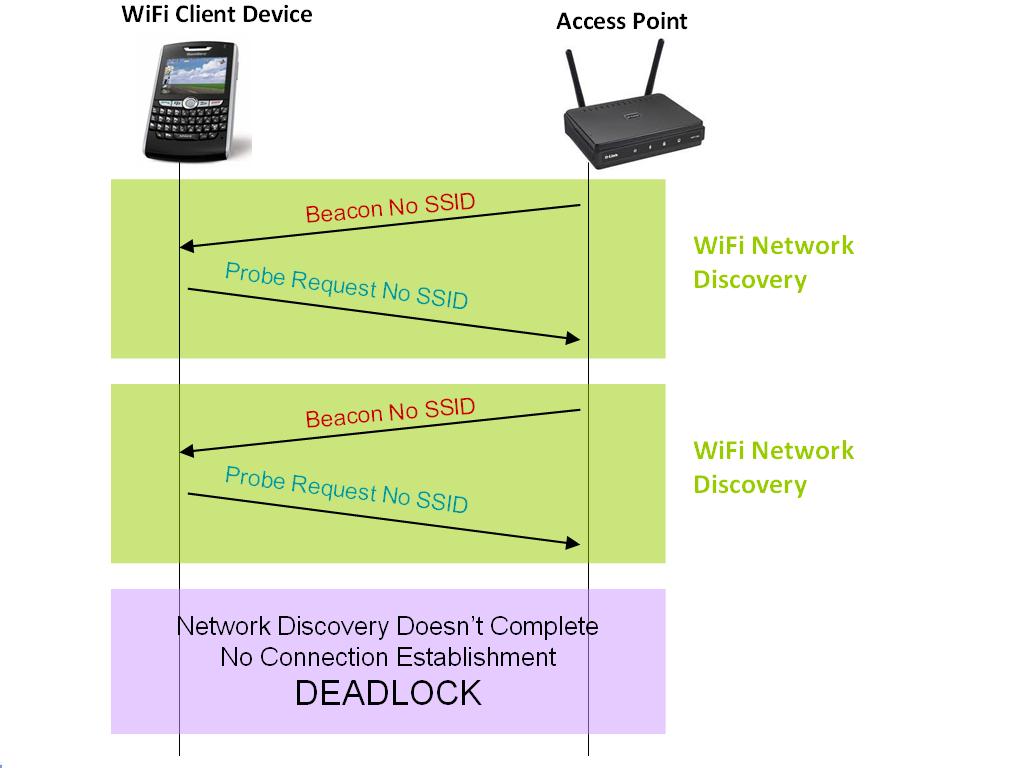
As soon as Mr. Patrick disables SSID broadcast, all APs present in the network stop advertising the name of the network. Clients which reveals the name of the trusted WiFi network in active scanning should be able to connect. But since Jhon is using a WiFi client which does not see advertise wireless network present in it’s preferred network list, so it send simply a null probe request. SSID broadcast disabled APs are not going to honor null porbe requests coming from Jhon's client and hence does not reveal the network name.
Figure 2: WiFi Connection Deadlock
As a result Jhon's client is not able to complete network discovery though the trusted WiF network exists in the range of the client. The scenario is depicted in the figure 2 above. Since the discovery does not complete, client does not initiate Authentication and Association with the AP and always remains in a wireless network scanning state. The condition in which wireless client is not able to discover its own trusted Wireless Network and the network is not able to serve legitimate wireless client device is termed as "Deadlock in WiFi Network".

First of all you should not turn off SSID broadcast, and if you done it and facing similar problem as reported by Jhon, then you must investigate and see whether you have your wireless network is in a Deadlock state or not.
The key take away of this post is:
"Disable SSID broadcast, but in Wireless Client Devices and Not in Access Points"

Friday, October 22, 2010

Beware Road Warriors! WPA2 Honeypot APs Might Haunt You.

Did you know that security enabled Honeypot APs are also possible. If not, you must read this. Wireless clients configured to connect to WEP secured WiFi networks can be attacked even if they are roaming thousands of miles away from their trusted WiFi networks. Just recall, how WEP cracking is done. One can either passively sniff and collect enough WEP encrypted DATA traffic. An active attack on WEP encrypted WiFi network is also possible. It requires presence of a wireless client and an AP and one encrypted ARP frame from client to AP. Attacker can replay this frame to generate more encrypted data traffic. Once the sufficient amount of data traffic is collected then aircrack-ng tool can be used to crack the WEP key. But in Caffe Latte attack, researchers have shown that WEP key can still be cracked even if client is not connected to any AP and present too far from its trusted WiFi network. 

Now, you might think why you should worry about it. You do not use WEP any ways. Your wireless device is configured to connect to WPA-PSK or WPA2-PSK based WiFi network. Then, here is a bad news for you. Author of the most popular WiFi cracking open source software has presented about PSK cracking in UNAM, Mexico. His talk can be downloaded from here. As per him older version of aircrack-ng tool needed all four frames of 4-way handshake to launch dictionary attack against PSK. But the latest version of aircrack-ng attack tool has been enhanced and now it only requires any two subsequent frames to launch attack.


Does this mean a PSK enabled WiFi honeypot AP can be planted to lure WiFi clients which have been connecting to such WiFi networks in the past. The answer is yes. If you see the 4-way handshake in the figure above, WiFi client device is first authenticated by AP. AP sends a 256 bit random number called ANONCE to challenge Client. Client responds to the challenge by generating MIC using Pairwise Transient Key (PTK). PTK generation requires knowledge of Passphrase, SSID, ANONCE and SNONCE. SNonce is also a 256 bit random number generated by client device to challenge AP.

An attacker can configure a Honeypot AP with any "passphrase". When a roaming wireless client connect to WPA2-PSK honeypot, it initiates higher layer 4-way handshake with the AP. Since the AP is not configured with right Passphrase as attacker does know this now, client does not authenticate Honeypot AP and does not connect to it. But in lieu of this attacker is able to capture initial two frames of 4-way handshake as shown in the figure above. Only these two frames are enough for latest aircrack-ng tool to launch dictionary attack and crack the passphrase, 

In fact, there is an online PSK cracking service available. I have written about wpacracker in the past. The trace file captured earlier can be uploaded to the wpacracker site and PSK can be cracked.

A few wireless clients which connect to WPA2-802.1x secured WiFi network can be victimized by setting up Honeypot AP. The attack is known as PEAP attack. Only those wireless Clients are vulnerable to this attack which do not verify certificate sent by an AP.

So the conclusion is that security enabled Honeypots are also possible. If you connect to WPA-PSK or WPA2-PSK based WiFi network then make sure the passphrase is a random mix of aphanumeric characters and its size is more than eight characters. If you are using PEAP, then make sure that wireless clients verify certificate sent by an AP.

Saturday, June 19, 2010

WEP, TKIP Declared Out…

If the fast spreading news on the Internet is to be believed, Wi-Fi alliance has decided to drop off WEP and TKIP encryption techniques from its certification criteria.

WEP was the only encryption techniques mentioned in the original IEEE 802.11 standard. Some flaws in the WEP encryption algorithm were discovered just after two years of release of WiFi standard and it was cracked in 2001. Since then several attacks on WEP have been published e.g. FMS attack, Korek attack, chop-chop attack, fragmentation attack, Aircrack-PTW attack, Caffe Latte attack etc.

TKIP was an enhancement over WEP. It was an attempt to provide better security to legacy WEP encryption capable devices and hence same RC4 technique with some modification was used in TKIP. The first and only attack on TKIP was published by Martin Beck and Erik Tews in 2008, five years after the release of TKIP specification for WiFi encryption. The attack was about injection of few small sized frames in the client to cause some disruption. It was not a key retrieving attack and unlike WEP, data privacy was guaranteed in TKIP.

The migration towards only-AES encryption mode will be done in stages over three years starting from 2011. From 2011, WiFi alliance will stop certifying APs with WEP or TKIP configuration. In 2012, wireless client devices will be axed for their support for WEP or TKIP. Starting from 2014, new WiFi devices which support only AES encryption will be certified. These requirements must be easily satisfied by device vendors by masking the disallowed encryption techniques just by applying software patch on the newly manufactured devices and if it happens, this will be a great move towards much needed secured wireless world.

A very interesting observation to note here is that the default configuration of most out of the box access points is “Open” which is a much bigger evil than WEP or TKIP. If a wireless LAN is operating in open mode all types of wireless attacks are possible e.g. data snooping, impersonation, unauthorized access to the network etc. The ideal move would be to support only one configuration in the Access Point and Client with the AES encryption as per the IEEE 802.11i and the IEEE 802.11w standard.

In short, the good (TKIP) and the bad (WEP) has been declared out but the ugly (Open configuration) will be continued to play!

Saturday, June 27, 2009

No Privacy Ensured in WPA/WPA2-PSK Protocol: Choose Your WLAN Security Circumspectly


In a wired network environment, it is not possible to see others communication by passively monitoring the wired interface. Which means you can not really snoop into someone’s IM chat or email or browsing activity. But what’s about wireless network. Is your wired network’s privacy guaranteed over wireless? If you have just learnt about the weaknesses of an Open or WEP enabled WiFi networks and planning to upgrade to WPA/WPA2, hold on for a while. Privacy is also not guaranteed in a WPA/WPA2-PSK protocol.


WiFi is one of the popular wireless technologies widely adopted as local area networking protocol today. But there is some security issues associated with it and hence its implications should be understood well in advance before use. For example unguided medium is used for transmission, which means, any communication of an Open WiFi network can be seen from hundreds of meters away from the network. WEP configuration does no better than Open AP as the encryption technique is known to be broken and does not provide security cover for more than few minutes if attacked.


WPA and WPA2 are two other more robust WiFi security configurations than WEP and support two different authentication mechanisms (i) IEEE 802.1x authentication framework (ii) Pre Shared Key or PSK. IEEE 802.1x based configuration is known as Enterprise mode configuration and PSK mode configuration is known as Personal mode configuration. While enterprise mode configuration requires certificate for client and server and infrastructure in place for deployment, personal mode simply requires a “passphrase” which acts like a password for WiFi network access. The ease of deployment of a personal mode secured WiFi network makes it an obvious choice for home and personal WiFi networks.


There are few attacks known to exist against WPA-WPA2-PSK mode configuration. For example dictionary attack is known to be effective against WPA/WPA2-PSK or Personal mode networks; it can be easily circumvented by prudently choosing “Passphrase” of more than 8 characters and a mix of special characters and alphabets. Recent attack on “TKIP” which is one of the WPA/WPA2 supported encryption techniques, can be mitigated by reducing re-keying interval or by changing underlying encryption technique to AES (advanced encrypted system).


The key point here is that the known attacks from a malicious outsider against WPA or WPA2-PSK based networks can be fixed but the protocol is also found to suffer from an insider threat. In an enterprise environment, where WiFi enabled devices are configured with single key, there is a very high likelihood of this secret key getting shared among trusted users and finally becoming public. Once this happens, the privacy of an authorized user is lost. Any malicious user present inside the network can capture wireless traffic and decode it with the help of single shared key. There are tools freely available on Internet which can be used to decode frames e.g. Wireshark Protocol Analyzer. More technical details can be found at:

http://wiki.wireshark.org/HowToDecrypt802.11


This implies that one can easily snoop into one’s internet browsing activity and steal valuable information or data flowing in the air.


So the final word about WPA/WPA2-PSK mode is that it is safe to setup a home or personal WiFi network , it 's use should be avoided in an environment where the network key is shared and distributed among its users. Wired equivalent user’s privacy is not guaranteed in a WPA/WPA2-PSK enabled WiFi network and hence, a judicious decision should be made while choosing security cover for the network.